Posts

Showing posts from April, 2021

A look at Dynamics 365 ERP and ERP Analytics MCP Servers

Image
MCP Servers Arrive in Preview for Dynamics 365 Finance and Supply Chain Recently, Microsoft has introduced MCP servers in preview for Dynamics 365 Finance and Supply Chain, marking a significant leap in the ERP ecosystem. This new capability means that organizations using Dynamics 365 can now leverage MCP servers to supercharge their interactions and analytics—all while maintaining the compliance and security standards expected from a modern cloud service. What Is an MCP Server? An MCP server is a specialized, cloud-managed platform designed to handle advanced analytics workloads for enterprise applications. By offloading data processing and analytical computations from the core operational databases, MCP servers enable faster, scalable, and more secure reporting and analysis. These servers are optimized for handling large datasets, real-time queries, and complex analytics scenarios, providing organizations with the agility to adapt to dynamic business needs. You can learn more abo...

Use Power Automate to alert the credit team that there is a new customer in Dynamics 365 Finance & SCM

Image
  Business scenario – Sales team needs to be able to add a new customer to Dynamics 365 Finance, but before the customer is used in Sales the Credit Team needs to review the record and set the proper credit limit and payment terms.   The customer should automatically go on hold until the review is complete, and an email should alert the Credit Team to act. Components used in the scenario – Dynamics 365 Finance business alerts and Power Automate Synopsis – By combining the business alert functionality of D365 with Power Automate the system can automatically manage this business process.   Power Automate will watch for a new customer to be added in D365.   When the new customer is added, Power Automate will automatically put the account on Hold with a status reason of New.   Power Automate will also send an email to the Credit Manager including the information from the new customer as well as a link to the On Hold Customers in D365. Step 1 – Create a custom...

Creating a Sales Assistant using Power Virtual Agent and Dynamics 365 Finance and Supply Chain

Image
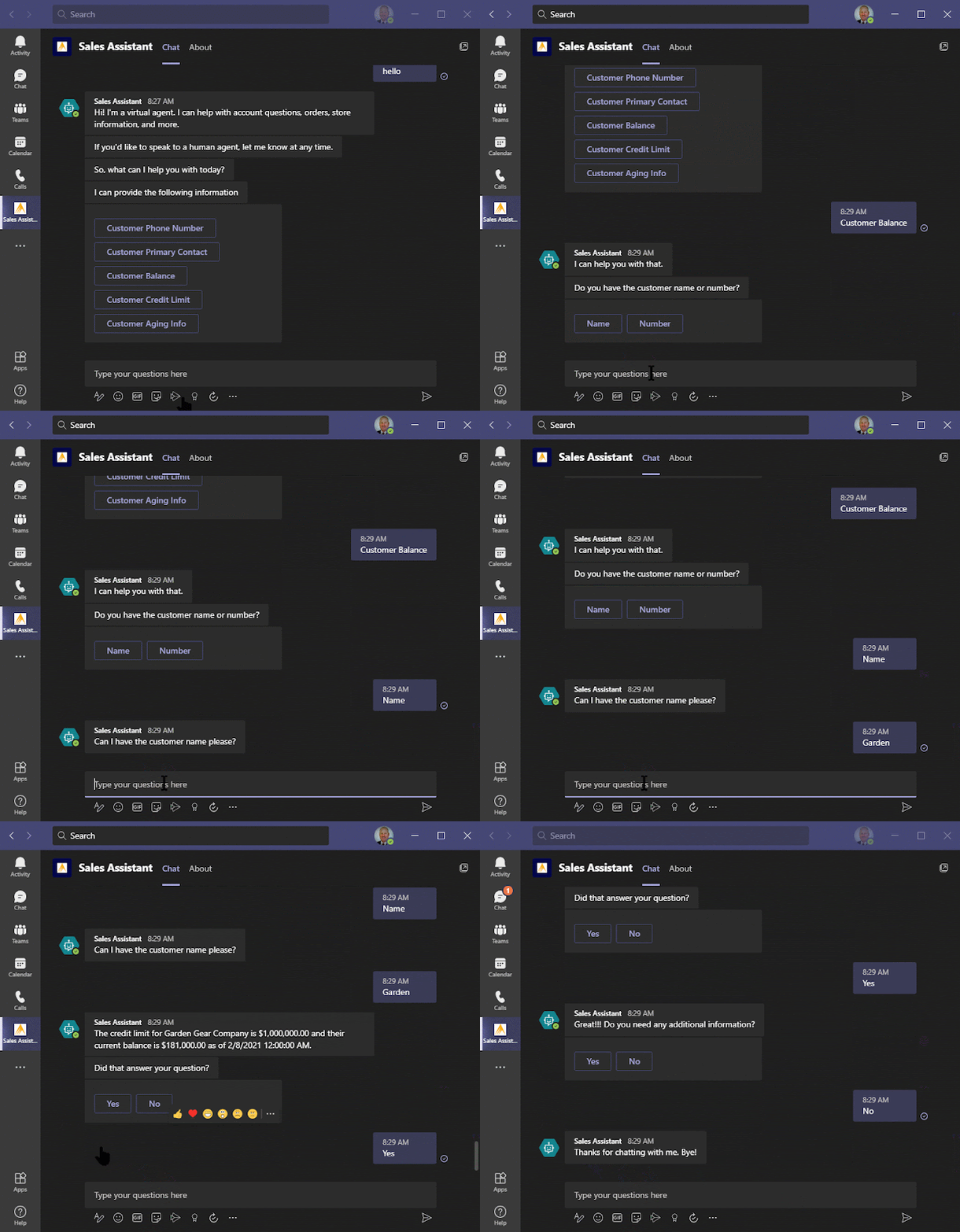
As I continue to learn more and more about Power Platform, I have been intrigued by Power Virtual Agent.  However, I have not spent too much time with it because I could never come up with a business scenario around Dynamics 365 Finance and Supply.  Whenever I think about a “Bot”, I think about the annoying little boxes that pop up on some websites trying to help me, and I just could not think of how I would use that with D365.   Recently as I was reading through various blogs, I learned I did not need a website to use Power Virtual Agent.  I could use the Bot inside of Microsoft Teams.  I also ran across an article from Henrik Marx Larsen https://henrikmarxlarsen.wordpress.com/2020/03/13/creating-a-customer-service-bot-for-dynamics-365-for-finance-and-operations-using-power-virtual-agents/ where he created a customer service bot with Dynamics 365.  I decided I would try to create a Sales Assistant to quickly answer some common questions that the sa...