Posts

Showing posts from April, 2023

AI in Financial Reporting

It has been a while since I posted, but I have been getting a lot of questions lately from clients and from my accounting students about the same topic:  Where does AI actually belong in the financial reporting process?  Everyone wants to know if they should be using it, and the honest answer is that it depends a lot on which part of the process you are talking about. I have been working with several clients on this over the last few months, plus I have an upcoming speaking session on AI in reporting, so I thought I would put some of these thoughts together here. For each point, I am also going to push back on myself a little, because I think that is a more useful way to think through this than just picking a side. Where AI is actually helping right now The clearest win I have seen is variance analysis. AI tools are good at scanning through a large number of GL lines and flagging the ones that look different from what history would predict. Think of a vendor payment that...

Progress Billings with Project Accounting & Sales Orders

Image
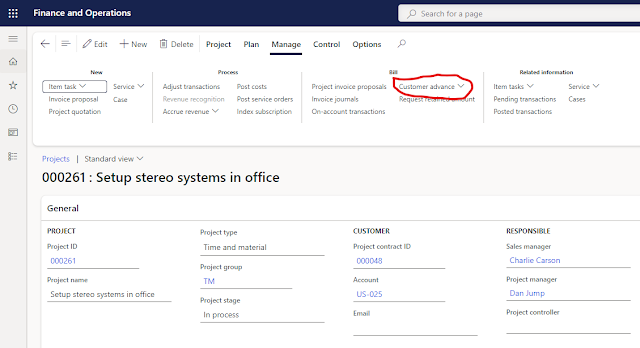
I was recently working with a couple customers that have very large orders and they need to invoice when the order is booked and maybe issue a couple progress invoices while the order is processed.  There are a few ways this can be handled in D365.  Unfortunately, Microsoft disabled the prepayment tab on the sales order tab in version 10.0.14 .  There is currently an idea posted inside the Microsoft ideas portal to add a function to handle prepayments.   Hopefully Microsoft will address this issue in the near future.  However, I needed to find a solution for today, and using Project Accounting seems to give an acceptable solution for managing the progress payments.   The key to this approach is using the Customer Advance on the Project screen.  It is also important to make sure you have setup the proper liability account for the prepayment invoice.  This is done in Project - Setup - Posting - Ledger Posting Setup. To see how this works in act...