MCP Servers Arrive in Preview for Dynamics 365 Finance and Supply Chain Recently, Microsoft has introduced MCP servers in preview for Dynamics 365 Finance and Supply Chain, marking a significant leap in the ERP ecosystem. This new capability means that organizations using Dynamics 365 can now leverage MCP servers to supercharge their interactions and analytics—all while maintaining the compliance and security standards expected from a modern cloud service. What Is an MCP Server? An MCP server is a specialized, cloud-managed platform designed to handle advanced analytics workloads for enterprise applications. By offloading data processing and analytical computations from the core operational databases, MCP servers enable faster, scalable, and more secure reporting and analysis. These servers are optimized for handling large datasets, real-time queries, and complex analytics scenarios, providing organizations with the agility to adapt to dynamic business needs. You can learn more abo...
Power BI Premium per User - pricing finally announced!!!
- Get link
- X
- Other Apps
A big change is coming to Power BI. Microsoft announced Premium by User for Power BI a few months back, but they had not given any indication of the pricing until now. Power BI Premium has been available for some time, but it is $5,000/P1 node. For many small to medium business with less than 300 to 500 users, this has just been too expensive and they have been missing out on all of the premium features, including;
- Automated machine learning
- Cognitive services
- No code data prep at scale
- Deployment pipelines
- Pixel-perfect paginated reports
- XMLA read/write
- Trillions of rows of data
- Advanced security
With this announcement of general availability beginning on April 2, 2021 at a price of $20 per user, per month, users are really going to have the opportunity to take their data to the next level.
To learn mores about the new Power BI Premium per user license, check out Microsoft's blog.
- Get link
- X
- Other Apps
Popular posts from this blog
RPA with Dynamics 365 Finance & Supply Chain
Are you looking for ways to automate some of your routine accounting functions, like reconciling sub ledgers to the general ledger? Microsoft has recently created some examples using Power Automate Desktop (think of it like Task Recording on steroids). It can not only automate steps through Dynamics 365, but it can also automate Excel and other applications. In one example from Microsoft they automate the AR to GL reconciliation: Automatic running of the AR aging and the customer/ledger reconciliation reports. Power Automate then extracts data from both reports in Excel and compares the balances. Power Automate then posts a Team message letting you know the subledger is in balance. Power Automate saves the reports with the date in the file name, so there is backup. Microsoft Directions & Example I working with the example, I needed to make a couple of adjustments to the sample flow that was provided but I was able to get it to work. Here is a video of the flow r...
DynamicsCon 2025 - Chicago
I am honored to be presenting at DynamicsCon 2025 in Chicago - May 13 - 16. https://dynamicscon.com/ I have two sessions: On Wednesday, May 14th at 3:45pm - I am co-presenting with Kent Nielsen. Our topic is Canvas vs. Model-Driven Power Apps. You can find our slides here: On Thursday, May 15th at 9:45am - I am presenting one of my most popular sessions - Getting started with Power Automate for D365 F&SCM. Even if you have seen this session before, there is some new info on environment variables, building solutions and storing approval information in D365. You can find my slides here :
Using Full Page Apps in Dynamics 365 Finance
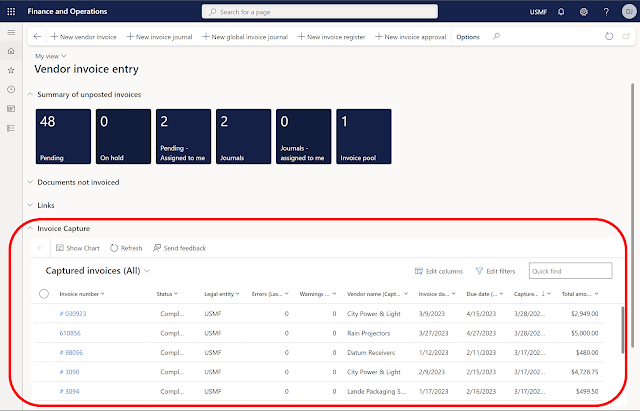
Have you ever wanted to put a website or a model-driven Power App in one of your existing Dynamics 365 Finance workspaces or forms? You might already know you can create a new workspace with a website, but did you know you can add the website to an existing workspace? Here is an example of the Vendor invoice entry workspace with the Invoice Capture Power App embedded. Prior to using this feature, you need to turn on "Saved views support for workspaces" in feature management. Once this feature is enabled you can follow the following steps to add the Invoice Capture app or any model-driven Power App or website to an existing workspace. Open the vendor invoice entry workspace From Options - choose Personalize this page From personalize menu - select the 3 dots - and then Add an app Once that is selected (the screen goes gray) - click on the section header where you want to add the app (in my example I put it in Links) On the Add an app menu - choose Website Give it a name (my e...
Comments
Post a Comment