Posts

AI in Financial Reporting

It has been a while since I posted, but I have been getting a lot of questions lately from clients and from my accounting students about the same topic:  Where does AI actually belong in the financial reporting process?  Everyone wants to know if they should be using it, and the honest answer is that it depends a lot on which part of the process you are talking about. I have been working with several clients on this over the last few months, plus I have an upcoming speaking session on AI in reporting, so I thought I would put some of these thoughts together here. For each point, I am also going to push back on myself a little, because I think that is a more useful way to think through this than just picking a side. Where AI is actually helping right now The clearest win I have seen is variance analysis. AI tools are good at scanning through a large number of GL lines and flagging the ones that look different from what history would predict. Think of a vendor payment that...

Recap of Dynamics Communities Summit 2022

  It has been about a week and a half since I returned from Summit.   This was at least my tenth Summit.   At this point I have lost track, but I certainly remember when there were only a couple hundred people.   A lot has changed in the past couple years.   They are not back to where they were in 2019, but this was a huge improvement over last year in Houston.   With over 600 sessions, there was a lot of content to choose from for the attendees.   Of course, this is both good and bad because which sessions do you attend?   You can’t be everywhere.   Also, there were issues with the event app and seating in many of the rooms, but they tried to address these as the event went on and have promised to learn from their mistakes.   It is an new staff since their last large event, and everyone is still trying to remember how to put on large events like this.   My firm had several clients attend the event, and they were overall happy with ...

What should I use, a hammer or screwdriver???

Image
  Lately, I have been working with several of our team members and clients regarding various reporting needs.   Since I do a lot of work with Power BI, they will bring me in because they believe Power BI is the correct answer.   In most cases, when they think Power BI, they are considering either the free version or Power BI Pro.   In other words, they are looking for a visualization to replace their report.   In many cases, this is possible, but other times there are struggles and issues.   It made me think about the toolbox I have in my garage.   I am not a handyman by any means, but I do have a few of your typical tools including a couple hammers and few screwdrivers so I can take care of various household projects, like hanging a picture, putting together furniture, building all the toys my wife is buying for our granddaughter, etc.   These household projects remind me a lot the various report requests I see from our clients.   Someti...

Smart Narratives - a quick and easy way to get your message across

Image
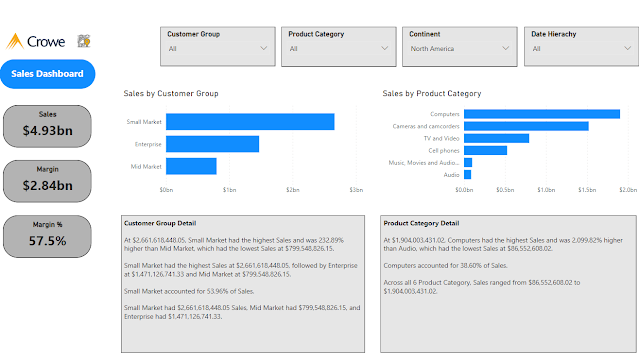
 I was recently working with a client on Power BI visualizations.  We were talking about various visualization techniques as well as the options for Power BI visuals.  As I was going through the different options, I touched on Smart Narrative.  The client had never seen or tried this visualization, so if made me wonder, how many other were not aware of this visualization option and how to use it. The Smart Narrative visualization became generally available in June, 2021.  The purpose of the Smart Narrative visualization is to help quickly summarize visuals and reports by providing relevant out-of-the-box insights that are customizable.  As the name applies, the visual adds narratives to the reports to address key takeaways and point out trends.   Initially, I was not too excited about this visualization, because I often feel a picture is worth a thousand words, so I would rather look at the chart or visualization and draw my own takeaways and tren...

Dynamics 365 Finance & Supply Chain with Power Automate - Part 3 - Adding a new vendor workflow

Image
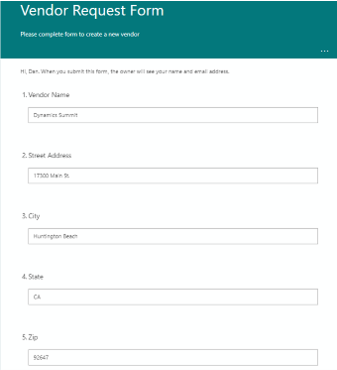
I recently presented a session on using Power Automate with Dynamics 365 Finance and Supply Chain.  The session was very well received, so I wanted to post some videos and details to help users better understand the examples I covered in the session. In the following video I will walk through using Power Automate with Dynamics 365 Finance & Supply Chain to manage a workflow around adding a new vendor. Business scenario  – To on board a new vendor, the organization requires a new vendor request be submitted, an internal review process is used, including sending an email to the vendor with the required tax documents (W9) and instructions. Components used in the scenario  – Dynamics 365 Finance virtual entities, Power Automate, Microsoft Forms, Microsoft OneDrive, Microsoft Teams and Outlook Synopsis  – By using an Automated cloud flow in Power Automate the system can automatically manage this business process.    Power Automate will listen for new vendor ...

Dynamics 365 Finance & Supply Chain with Power Automate - Part 2 - Adding a new customer

Image
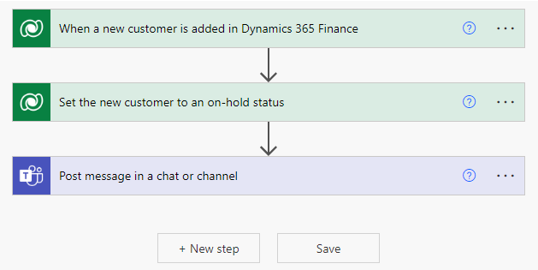
I recently presented a session on using Power Automate with Dynamics 365 Finance and Supply Chain.  The session was very well received, so I wanted to post some videos and details to help users better understand the examples I covered in the session. In the following video I will walk through using Power Automate with Dynamics 365 Finance & Supply Chain to manage a workflow around adding a new customer. Business scenario  – The sales team adds new customers to Dynamics 365 Finance, but the company wants a business workflow in place, so the credit team can review the account and set the credit limit before any activity takes place on the new customer. Components used in the scenario  – Dynamics 365 Finance virtual entities, Power Automate and Microsoft Teams and/or Outlook Synopsis  – By using an Automated cloud flow in Power Automate the system can automatically manage this business process.    Power Automate will listen for new rows (customers) being a...

Dynamics 365 Finance & Supply Chain with Power Automate - Part 1

Image
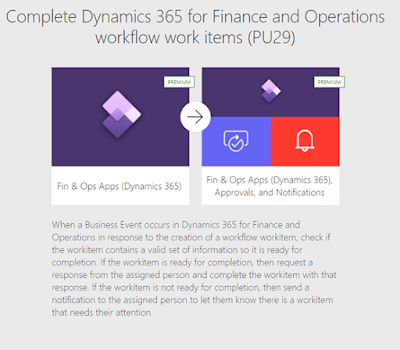
I recently presented a session on using Power Automate with Dynamics 365 Finance and Supply Chain.  The session was very well received, so I wanted to post some videos and details to help users better understand the examples I covered in the session. In the following video I will walk through using Power Automate with Dynamics 365 Finance & Supply Chain workflow. Business scenario  – AP team needs to be able to manage invoice approval workflow through Teams and Outlook and not just inside of Dynamics 365 Finance. Components used in the scenario  – Dynamics 365 Finance workflow and Power Automate Synopsis  – By using a template available in Power Automate the system can automatically manage this business process.    Power Automate will watch for vendor invoice workflows in D365 and send the information to the appropriate users in Teams and Outlook to review and approve the invoice. An out of the box template is available for using Power Automate with Dyn...

Dynamics 365 Finance & Operations Summit - April 8, 2022

Image
I am excited to be presenting on Using Power Automate with Dynamics 365 F&O at the Dynamics 365 Finance & Operations Summit.  In my session, I will share several examples on how I have used Power Automate to address clients requirements.  This includes workflow around vendors and customers, using Power Automate with D365 workflow, and integrating Excel, OneDrive and F&O. If you would like to take a look at my slides, they are available below. Download my slides here