Posts

Showing posts from May, 2022

Microsoft Convergence is back

 It has been over 10 years since Microsoft hosted their Convergence conference for Microsoft business applications.  It is happening in Miami, FL on December 10th & 11th.  I am lucky to be attending and also presenting a session.  My session will be Using Power Platform to automate the accounting department in Dynamics 365 Finance.  Hopefully you will be attending and have an opportunity to join my session. I am posting my slides here, so if you attend and want the slides, you can get them here.  Using Power Platform slides   Even if you are unable to make the session, feel free to download my slides.

Dynamics 365 Finance & Supply Chain with Power Automate - Part 3 - Adding a new vendor workflow

Image
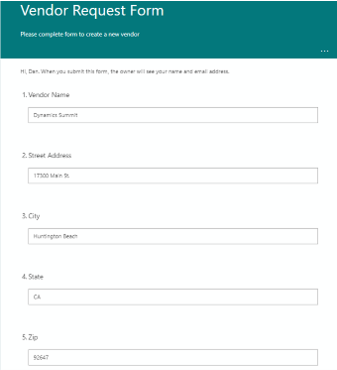
I recently presented a session on using Power Automate with Dynamics 365 Finance and Supply Chain.  The session was very well received, so I wanted to post some videos and details to help users better understand the examples I covered in the session. In the following video I will walk through using Power Automate with Dynamics 365 Finance & Supply Chain to manage a workflow around adding a new vendor. Business scenario  – To on board a new vendor, the organization requires a new vendor request be submitted, an internal review process is used, including sending an email to the vendor with the required tax documents (W9) and instructions. Components used in the scenario  – Dynamics 365 Finance virtual entities, Power Automate, Microsoft Forms, Microsoft OneDrive, Microsoft Teams and Outlook Synopsis  – By using an Automated cloud flow in Power Automate the system can automatically manage this business process.    Power Automate will listen for new vendor ...

Dynamics 365 Finance & Supply Chain with Power Automate - Part 2 - Adding a new customer

Image
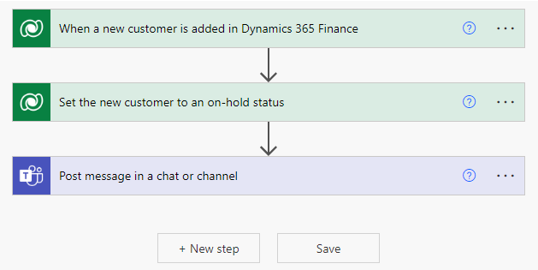
I recently presented a session on using Power Automate with Dynamics 365 Finance and Supply Chain.  The session was very well received, so I wanted to post some videos and details to help users better understand the examples I covered in the session. In the following video I will walk through using Power Automate with Dynamics 365 Finance & Supply Chain to manage a workflow around adding a new customer. Business scenario  – The sales team adds new customers to Dynamics 365 Finance, but the company wants a business workflow in place, so the credit team can review the account and set the credit limit before any activity takes place on the new customer. Components used in the scenario  – Dynamics 365 Finance virtual entities, Power Automate and Microsoft Teams and/or Outlook Synopsis  – By using an Automated cloud flow in Power Automate the system can automatically manage this business process.    Power Automate will listen for new rows (customers) being a...