Posts

Showing posts with the label #PowerQuery

When One Agent Tried to DO Everything

Image
When One Agent Tried to DO Everything The second article in my Finance Agent series My first Collection Manager Agent worked well - until I kept giving it more jobs. What started as a customer-review assistant grew to hanle automated credit-hold analysis, collection-call preparation, and customer email drafting. Each addition made sense. Together, they created a problem. In my first article, I mentioned the importance of narrower scope. This time, I want to show you what happened when I ignored that lesson. Watch: Why I Split One Agent Into Three What the First Version Was Asked to Do The first Collection Manager Agent started with a simple job. Review a customer. Pull the aging, the credit limit, the open invoices. Tell me what to do next. It did that well. Then I started adding to it. • I wanted it to react automatically when a sales order was placed on credit hold. • I wanted it to prepare me for a collection call. • I wanted it to review disputes and promises to pay. • I wa...

COVID 19 Dashboard – Article 5 – Working with maps

Image
I will continue to build on my earlier posts about my  COVID19 Dashboard .    In this series, I am writing a few different blog articles describing not only how I built it, but some things I learned in the process. The current list of planned topics include: Working with growing CSV files Using index and merge when transforming data Using time functions to calculate the daily change Reporting based on the population Working with maps, setting data types correctly Possibly more to come depending on how long this all goes…. PART 5 – Working with maps I will be the first to admit, I have not used the mapping features in Power BI very often.   I have used them for some simple demos, but being an accountant, I am more often interested in the numbers versus the visual location.   However, when analyzing a global pandemic, I felt a map visual or two might be important. So without going to any custom visuals, there are four map visualizations in Po...

COVID 19 Dashboard – Article 4 – Reporting based on population

Image
I will continue to build on my earlier posts about my  COVID19 Dashboard .    In this series, I am writing a few different blog articles describing not only how I built it, but some things I learned in the process. The current list of planned topics include: Working with growing CSV files Using index and merge when transforming data Using time functions to calculate the daily change Reporting based on the population Working with maps, setting data types correctly Possibly more to come depending on how long this all goes…. PART 4 - Reporting based on population In looking at the data, I quickly realized simply looking at total numbers or even daily changes was only giving me a limited view of what was happening.     Were the large number of cases in New York simply because they have more people than most other states, or were they growing at a different rate.   Are New York citizens at a higher risk of acquiring the virus than California ...

COVID 19 Dashboard - Article 3 - Adding some key measures - unique time functions

Image
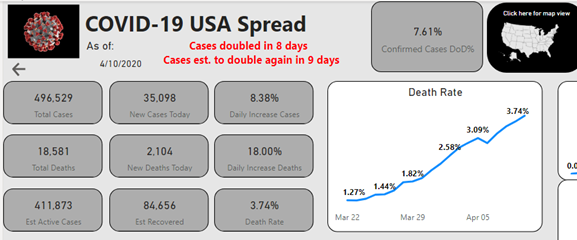
I will continue to build on my earlier posts about my COVID19 Dashboard .   In this series, I am writing a few different blog articles describing not only how I built it, but some things I learned in the process. The current list of planned topics include: Working with growing CSV files Using index and merge when transforming data Using time functions to calculate the daily change Reporting based on the population Working with maps, setting data types correctly Possibly more to come depending on how long this all goes…. PART 3 – Adding some key measures In my earlier posts, I spent time explaining where I acquired the data and some key steps I took in transforming the data into the data model.   In this post, I will explain some of the DAX I used to create some of the key measures for the visualizations.   One of the first steps in design is to identify what questions you are trying to answer or the story you are trying to tell with your visualization...

COVID 19 Dashboard – Article 2 - Transforming the Data – Calculating between rows in Power Query

Image
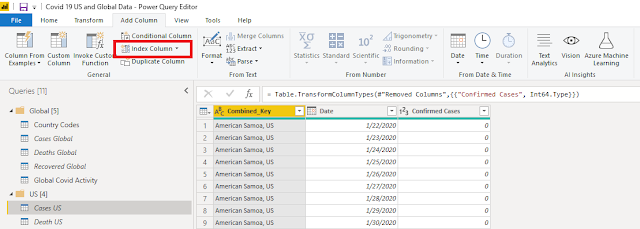
I will continue to build on my earlier posts about my COVID19 Dashboard .   In this series, I am writing a few different blog articles describing not only how I built it, but some things I learned in the process. The current list of planned topics include:   Working with growing CSV files   Using index and merge when transforming data   Using time functions to calculate the daily change   Reporting based on the population   Working with maps, setting data types correctly   Possibly more to come depending on how long this all goes…. PART 2 – Continuing to transform the data In my first post, I explained how I brought in data from a CSV file and used “Unpivot Columns” to transform the data into a format that works much better for reporting.   Once the data was in this format, I quickly noticed that the values (Cases, Deaths and Recoveries) were cumulative.   In other words, these amounts were ending balances not daily tra...