Posts

Showing posts from September, 2017

A look at Dynamics 365 ERP and ERP Analytics MCP Servers

Image
MCP Servers Arrive in Preview for Dynamics 365 Finance and Supply Chain Recently, Microsoft has introduced MCP servers in preview for Dynamics 365 Finance and Supply Chain, marking a significant leap in the ERP ecosystem. This new capability means that organizations using Dynamics 365 can now leverage MCP servers to supercharge their interactions and analytics—all while maintaining the compliance and security standards expected from a modern cloud service. What Is an MCP Server? An MCP server is a specialized, cloud-managed platform designed to handle advanced analytics workloads for enterprise applications. By offloading data processing and analytical computations from the core operational databases, MCP servers enable faster, scalable, and more secure reporting and analysis. These servers are optimized for handling large datasets, real-time queries, and complex analytics scenarios, providing organizations with the agility to adapt to dynamic business needs. You can learn more abo...

Making the important numbers stand out

Image
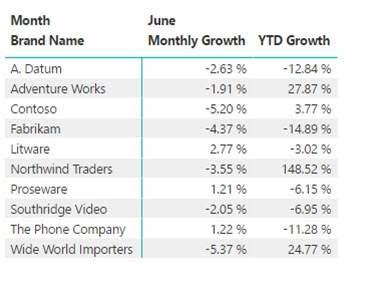
With so much information available today, many people are simply overwhelmed by the data.  This is important for us to remember when we are designing reports and visualizations.  We need to help our users understand the story we are telling and one way to do this is to draw their attention to the important information. The eyes go directly to change and difference, so conditional formatting is a great way to make data stand out.  However conditional formatting in Power BI can produce some pretty ugly results.  In this article, I am going to show some tips to help use conditional formatting to focus on key numbers of the report. I will start with a simple matrix report that shows the monthly and yearly sales growth by brand.  In this case we only have 10 brands, but you will notice nothing really jumps out to you.  As a consumer of this report you must read through each row. So let’s go to the format tab on the visualization pane and turn o...

A recap of Power BI World Tour - New York

Image
I am just returning from presenting at the Power BI World Tour in New York.  This was a great event with around 150 attendees from many different companies.  Some were experienced with Power BI and many were just getting started. Microsoft presented a roadmap session on Power BI and showed some of the new and upcoming features.  I was excited to see Bookmarks.  This feature will allow for improved navigation through reports and really help with storytelling.  There were also other sessions on licensing, Enterprise governance, PowerApps, Flow and Azure Data Warehouse.  In addition, many partners and consultants presented sessions covering everything from basic DAX to developing a Business Intelligence Roadmap.   Of course there was also time to meet other users and a lot of learning took place at breaks and meals. I was lucky to assist in moderating one of the closing sessions, Use What You Learned.  Many in the session were new...