It has been a while since I posted, but I have been getting a lot of questions lately from clients and from my accounting students about the same topic: Where does AI actually belong in the financial reporting process? Everyone wants to know if they should be using it, and the honest answer is that it depends a lot on which part of the process you are talking about. I have been working with several clients on this over the last few months, plus I have an upcoming speaking session on AI in reporting, so I thought I would put some of these thoughts together here. For each point, I am also going to push back on myself a little, because I think that is a more useful way to think through this than just picking a side. Where AI is actually helping right now The clearest win I have seen is variance analysis. AI tools are good at scanning through a large number of GL lines and flagging the ones that look different from what history would predict. Think of a vendor payment that...
DynamicsCon 2025 - Chicago
- Get link
- X
- Other Apps
I am honored to be presenting at DynamicsCon 2025 in Chicago - May 13 - 16. https://dynamicscon.com/
I have two sessions:
On Wednesday, May 14th at 3:45pm - I am co-presenting with Kent Nielsen. Our topic is Canvas vs. Model-Driven Power Apps.
On Thursday, May 15th at 9:45am - I am presenting one of my most popular sessions - Getting started with Power Automate for D365 F&SCM. Even if you have seen this session before, there is some new info on environment variables, building solutions and storing approval information in D365.
- Get link
- X
- Other Apps
Popular posts from this blog
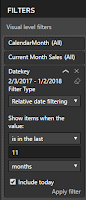
Showing the last 12 months based on a date slicer
When working with financial and sales data, clients often ask for charts showing the last 12 months of data. This is actually very simple using relative date filtering. In addition, they might ask to compare to the same month last year. With a simple DAX calculation (SAMEPERIODLASTYEAR) it is possible to add this measure. Here is the formula: Same Month Last Year = CALCULATE(Sum(Sales[SalesAmount]),SAMEPERIODLASTYEAR('Date'[Datekey])) For many users this is all they need. The chart will update each month and they will always be able to see the last 12 months. However, this chart will not work with date slicers. If the client adds a date slicer to the page and selects just one month, the chart will be limited to one month. The reason the chart is limited to one month is because the date dimension relates to the sales fact table and it filters the data for the selected month. Howe...
Adding a new entity to Dual-write in Dynamics 365 Finance
As Microsoft continues to grow, expand and improve Dynamics 365 Finance and Supply, one of the most powerful features released has been Dual-write. Dual-write is an out-of-box infrastructure the provides near-real-time interaction between customer engagement apps and Finance and Supply Chain apps. In summary, it is a tightly coupled, bidirectional integration between Finance and Supply Chain applications and Dataverse (formally known as Common Data Service). Dual-write makes integration with Dynamics 365 Sales and other CE application very straight forward. It also opens up the opportunities to use PowerApps, Power Portal and Power Virtual Agent with Dynamics 365 Finance and Supply Chain apps by connecting through the Dataverse. There is already documentation from Microsoft as well as many blogs already available on setting up Dataverse. Here are a few links: Microsoft Documentation Dynagile Consulting Sandeep Chaudhury ERP Coder Blog Instead...
A look at Dynamics 365 ERP and ERP Analytics MCP Servers
MCP Servers Arrive in Preview for Dynamics 365 Finance and Supply Chain Recently, Microsoft has introduced MCP servers in preview for Dynamics 365 Finance and Supply Chain, marking a significant leap in the ERP ecosystem. This new capability means that organizations using Dynamics 365 can now leverage MCP servers to supercharge their interactions and analytics—all while maintaining the compliance and security standards expected from a modern cloud service. What Is an MCP Server? An MCP server is a specialized, cloud-managed platform designed to handle advanced analytics workloads for enterprise applications. By offloading data processing and analytical computations from the core operational databases, MCP servers enable faster, scalable, and more secure reporting and analysis. These servers are optimized for handling large datasets, real-time queries, and complex analytics scenarios, providing organizations with the agility to adapt to dynamic business needs. You can learn more abo...
.jpeg)

Comments
Post a Comment