Posts

AI in Financial Reporting

It has been a while since I posted, but I have been getting a lot of questions lately from clients and from my accounting students about the same topic:  Where does AI actually belong in the financial reporting process?  Everyone wants to know if they should be using it, and the honest answer is that it depends a lot on which part of the process you are talking about. I have been working with several clients on this over the last few months, plus I have an upcoming speaking session on AI in reporting, so I thought I would put some of these thoughts together here. For each point, I am also going to push back on myself a little, because I think that is a more useful way to think through this than just picking a side. Where AI is actually helping right now The clearest win I have seen is variance analysis. AI tools are good at scanning through a large number of GL lines and flagging the ones that look different from what history would predict. Think of a vendor payment that...

AI in Financial Reporting

It has been a while since I posted, but I have been getting a lot of questions lately from clients and from my accounting students about the same topic:  Where does AI actually belong in the financial reporting process?  Everyone wants to know if they should be using it, and the honest answer is that it depends a lot on which part of the process you are talking about. I have been working with several clients on this over the last few months, plus I have an upcoming speaking session on AI in reporting, so I thought I would put some of these thoughts together here. For each point, I am also going to push back on myself a little, because I think that is a more useful way to think through this than just picking a side. Where AI is actually helping right now The clearest win I have seen is variance analysis. AI tools are good at scanning through a large number of GL lines and flagging the ones that look different from what history would predict. Think of a vendor payment that...

A look at Dynamics 365 ERP and ERP Analytics MCP Servers

Image
MCP Servers Arrive in Preview for Dynamics 365 Finance and Supply Chain Recently, Microsoft has introduced MCP servers in preview for Dynamics 365 Finance and Supply Chain, marking a significant leap in the ERP ecosystem. This new capability means that organizations using Dynamics 365 can now leverage MCP servers to supercharge their interactions and analytics—all while maintaining the compliance and security standards expected from a modern cloud service. What Is an MCP Server? An MCP server is a specialized, cloud-managed platform designed to handle advanced analytics workloads for enterprise applications. By offloading data processing and analytical computations from the core operational databases, MCP servers enable faster, scalable, and more secure reporting and analysis. These servers are optimized for handling large datasets, real-time queries, and complex analytics scenarios, providing organizations with the agility to adapt to dynamic business needs. You can learn more abo...

Microsoft Convergence is back

 It has been over 10 years since Microsoft hosted their Convergence conference for Microsoft business applications.  It is happening in Miami, FL on December 10th & 11th.  I am lucky to be attending and also presenting a session.  My session will be Using Power Platform to automate the accounting department in Dynamics 365 Finance.  Hopefully you will be attending and have an opportunity to join my session. I am posting my slides here, so if you attend and want the slides, you can get them here.  Using Power Platform slides   Even if you are unable to make the session, feel free to download my slides.

Business Analytics and Visualization

Image
It has been a while since I posted a blog article.  Things have been busy and unfortunately my blog has suffered.  Not only have I been busy working in the Microsoft Dynamics 365 and Power Platform arena, but I have also been teaching at a local university.  This past semester I taught Business Analytics and Visualization.  It was a fun course to teach and I was able to introduce business students to the power of analytics using both Power BI and Tableau.  The text for the course was Introduction to Business Analytics, 1 st Edition by Vernon Richardson & Marci Watson.  The text did a great job of covering the types of analytics and the mindset and approach you should follow as a business analyst.  I recently used some of this material in a presentation at an FPnA conference, and it was well received, so I thought I would put the thoughts together here for everyone to read. In today's data-driven world, the ability to transform raw data into meanin...

DynamicsCon 2025 - Chicago

Image
I am honored to be presenting at DynamicsCon 2025 in Chicago - May 13 - 16.  https://dynamicscon.com/ I have two sessions: On Wednesday, May 14th at 3:45pm - I am co-presenting with Kent Nielsen.  Our topic is Canvas vs. Model-Driven Power Apps. You can find our slides here:  On Thursday, May 15th at 9:45am - I am presenting one of my most popular sessions - Getting started with Power Automate for D365 F&SCM.  Even if you have seen this session before, there is some new info on environment variables, building solutions and storing approval information in D365. You can find my slides here : 

RPA with Dynamics 365 Finance & Supply Chain

Image
Are you looking for ways to automate some of your routine accounting functions, like reconciling sub ledgers to the general ledger?   Microsoft has recently created some examples using Power Automate Desktop (think of it like Task Recording on steroids). It can not only automate steps through Dynamics 365, but it can also automate Excel and other applications. In one example from Microsoft they automate the AR to GL reconciliation: Automatic running of the AR aging and the customer/ledger reconciliation reports. Power Automate then extracts data from both reports in Excel and compares the balances. Power Automate then posts a Team message letting you know the subledger is in balance. Power Automate saves the reports with the date in the file name, so there is backup. Microsoft Directions & Example   I working with the example, I needed to make a couple of adjustments to the sample flow that was provided but I was able to get it to work. Here is a video of the flow r...

Copilot Dynamics 365 Finance & Supply

Image
Microsoft has recently released two Copilot applications to work with Dynamics 365 Finance & Supply Chain. These solutions are still in preview, so it should only be uses in sandbox environments to evaluate and learn how they will work with your organization. Prior to installing it is important to make sure your environment meets the requirements. Dynamics 365 Finance & Supply Chain requires the latest hotfix on Dynamics 365 Finance version 10.0.34 (10.0.1591.107) and version 10.0.35 (10.0.1627.70) and later. In addition, the solutions rely on the Power Platform and Dataverse, so it is important to have the environments connected and user security set appropriately. For more details on the prerequisites and the installation instructions you can follow the Microsoft installation documents. Copilot in Microsoft Dynamics 365 Finance Copilot in Microsoft Dynamics 365 Supply Chain Let's look at what these two copilots provide to users Copilot in Microsoft Dynamics 365 Finance C...

Copilot in Power BI Desktop

Image
We have been hearing a lot about Artificial Intelligence recently, and Microsoft is investing very heavily in brining AI to many of the solutions we use on a regular basis.  In many solutions the AI solution is known at Copilot.   Copilot in Power BI Desktop is currently available in preview for you to start testing.  After playing with it a little, I would have to say it is a nice tool, but I will caution you that you need to be careful.  It is simply going to give you some suggestions on creating new measures, but if you do not understand DAX, you may not select the correct version. So how do you get started?   1. First you need to be on a current release of Power BI Desktop (at least after May 2923) 2. The feature is still in Preview, so it is necessary to enable the preview feature.  File - Options and Settings - Options and enable Quick measure suggestions 3.  To use Copilot, you select to add a Quick Measure (this can be selected on the...

D365 Finance - Business Performance Analytics

Image
Microsoft recently released a new reporting / analytic solution to public preview.  The solution is Business Performance Analytics.  They have been talking about this solution for some time, so it is great to finally be able to get our hands on the solution. To get the directions to install the preview simply go to Microsoft docs . One thing to note is the solution requires a Tier-2 environment and Dynamics 365 Finance version 10.0.35 and PU 59 or later.  As with many of the recent solutions from Microsoft, this solution is built on the Power Platform as a model driven application.   The solution also includes embedded Power BI.  Since there is some good documentation on the installation steps, I will not go through it in my article.  I will take a look at what the solution provides at this point. As you can see from the screen shot, this solution is very similar to the embedded Power BI that is currently inside of D365.  One of the differences is...

Using Full Page Apps in Dynamics 365 Finance

Image
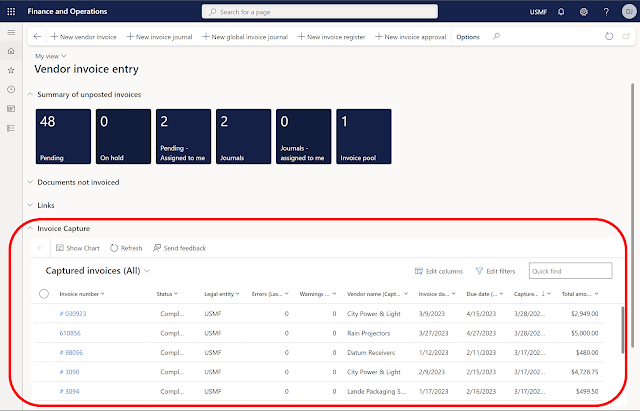
Have you ever wanted to put a website or a model-driven Power App in one of your existing Dynamics 365 Finance workspaces or forms?  You might already know you can create a new workspace with a website, but did you know you can add the website to an existing workspace? Here is an example of the Vendor invoice entry workspace with the Invoice Capture Power App embedded. Prior to using this feature, you need to turn on "Saved views support for workspaces" in feature management. Once this feature is enabled you can follow the following steps to add the Invoice Capture app or any model-driven Power App or website to an existing workspace. Open the vendor invoice entry workspace From Options - choose Personalize this page From personalize menu - select the 3 dots - and then Add an app Once that is selected (the screen goes gray) - click on the section header where you want to add the app (in my example I put it in Links) On the Add an app menu - choose Website Give it a name (my e...

Progress Billings with Project Accounting & Sales Orders

Image
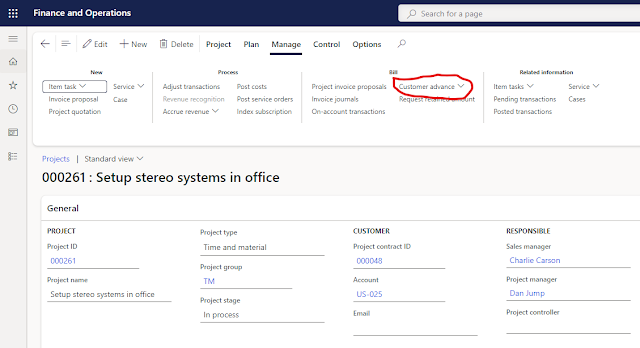
I was recently working with a couple customers that have very large orders and they need to invoice when the order is booked and maybe issue a couple progress invoices while the order is processed.  There are a few ways this can be handled in D365.  Unfortunately, Microsoft disabled the prepayment tab on the sales order tab in version 10.0.14 .  There is currently an idea posted inside the Microsoft ideas portal to add a function to handle prepayments.   Hopefully Microsoft will address this issue in the near future.  However, I needed to find a solution for today, and using Project Accounting seems to give an acceptable solution for managing the progress payments.   The key to this approach is using the Customer Advance on the Project screen.  It is also important to make sure you have setup the proper liability account for the prepayment invoice.  This is done in Project - Setup - Posting - Ledger Posting Setup. To see how this works in act...

AP Automation in Dynamics 365 Finance and Supply Chain

As a solution architect, prospects and clients often ask me for ways to improve their Accounts Payable process.  They receive hundreds of invoices every month, and it can take considerable amount of time to enter all of the detail as well as attaching the invoice for reference during the approval process.  This is an area where we have often needed to bring in an ISV solution, but that could cause other issues.  Microsoft has been doing considerable work around automation for AP and they recently released a public preview of their Invoice Capture solution. I have had the opportunity to set this up in one of my test environments so I could get an idea of what they have to offer.  As we would expect, the Invoice Capture solution is built on the Power Platform.  It uses a model driven Power App along with Power Automate Flows to integrate with Dynamics 365 Finance.  However, since it is a solution, they have done much of the work for you, including creating th...

Big news from Microsoft on paginated reports

To follow up on my earlier posting about using the right tool for the right job, I had to share the latest announcement from Microsoft.  On November 14, 2022, Microsoft announced support for paginated reports in Power BI Pro.   Yes, this now means without acquiring a premium license or premium workspace, you will be able to create paginated reports.  No longer will you just have a scrolling table or matrix that you have to export to Excel, you will be able to create more traditional operational reports as well as document-like reports. I am excited to see how everyone puts this new functionality to work.  I have a lot of ideas on how I will use this with my clients, especially with some of their common ERP (Dynamics 365) report requests.

Recap of Dynamics Communities Summit 2022

  It has been about a week and a half since I returned from Summit.   This was at least my tenth Summit.   At this point I have lost track, but I certainly remember when there were only a couple hundred people.   A lot has changed in the past couple years.   They are not back to where they were in 2019, but this was a huge improvement over last year in Houston.   With over 600 sessions, there was a lot of content to choose from for the attendees.   Of course, this is both good and bad because which sessions do you attend?   You can’t be everywhere.   Also, there were issues with the event app and seating in many of the rooms, but they tried to address these as the event went on and have promised to learn from their mistakes.   It is an new staff since their last large event, and everyone is still trying to remember how to put on large events like this.   My firm had several clients attend the event, and they were overall happy with ...

What should I use, a hammer or screwdriver???

Image
  Lately, I have been working with several of our team members and clients regarding various reporting needs.   Since I do a lot of work with Power BI, they will bring me in because they believe Power BI is the correct answer.   In most cases, when they think Power BI, they are considering either the free version or Power BI Pro.   In other words, they are looking for a visualization to replace their report.   In many cases, this is possible, but other times there are struggles and issues.   It made me think about the toolbox I have in my garage.   I am not a handyman by any means, but I do have a few of your typical tools including a couple hammers and few screwdrivers so I can take care of various household projects, like hanging a picture, putting together furniture, building all the toys my wife is buying for our granddaughter, etc.   These household projects remind me a lot the various report requests I see from our clients.   Someti...

Smart Narratives - a quick and easy way to get your message across

Image
 I was recently working with a client on Power BI visualizations.  We were talking about various visualization techniques as well as the options for Power BI visuals.  As I was going through the different options, I touched on Smart Narrative.  The client had never seen or tried this visualization, so if made me wonder, how many other were not aware of this visualization option and how to use it. The Smart Narrative visualization became generally available in June, 2021.  The purpose of the Smart Narrative visualization is to help quickly summarize visuals and reports by providing relevant out-of-the-box insights that are customizable.  As the name applies, the visual adds narratives to the reports to address key takeaways and point out trends.   Initially, I was not too excited about this visualization, because I often feel a picture is worth a thousand words, so I would rather look at the chart or visualization and draw my own takeaways and tren...